Integration Setup with ASD
A step-by-step guide to connecting your systems with ALT Sports Data, from first API call to production-ready integration.
Integration Setup with ASD
This guide walks through the typical path from "I have an API key" to "we are serving live traffic in production." Most teams complete the process in one to two weeks, depending on scope.
Phase 1: Define scope
Before writing code, align your team on what you are building.
- Which sports? Check Sports coverage to confirm the sports and leagues available.
- Which data surfaces? Decide whether you need live odds, futures, historical data, or a combination. Each has a different integration pattern.
- Which markets? Not every sport supports every market type. Use
/sportsand/marketsto see what is available for your target sports. See Money, Betting Lines, Markets for details on how market structures vary by archetype.
Phase 2: Authenticate and validate
Confirm your credentials work and the API is reachable from your environment.
- Set your API key as an environment variable (never hard-code it). See Credentials Management.
- Call the Health endpoint -- expect a
200response. - Call the Info endpoint -- confirm your account details, scope, and rate-limit tier.
- Call
/sports-- verify you see the sports your agreement covers.
If any step fails, check Authentication for header format requirements and Errors for status code explanations.
Phase 3: Map sports and markets
Build a mapping layer between ALT Sports Data's sport and market taxonomy and your internal product model.
- Sports -- Each sport has an archetype (combat, racing, team, jai alai, etc.) that determines its market structure and settlement behavior. Store the sport ID and archetype locally.
- Markets -- Query
/marketsto get the full catalog. Filter by sport to see which market types apply. Map these to your internal bet-type taxonomy. - Events -- Load
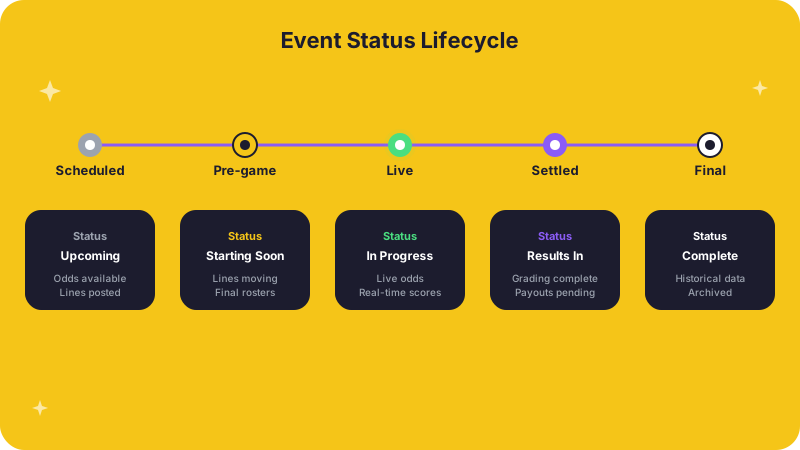
/eventsfor a single sport to understand the event lifecycle: upcoming, live, completed, settled. Your UI and backend logic need to handle each status.
Phase 4: Build the event workflow
Events are the core object in most integrations. A typical flow:
- List events -- Call
/eventsfiltered by sport and date range. Cache the results with a short TTL. - Fetch event odds -- For each event, retrieve odds from the event-level odds endpoint. The response includes all available markets for that event.
- Fetch participants -- For matchup display, pull participant data (fighters, teams, racers, etc.) from the event participants endpoint.
- Handle status transitions -- Events move through statuses as they progress. Your system should react to changes: start displaying odds when an event moves to "upcoming," suspend markets during delays, and trigger settlement when results post.
Phase 5: Handle operational edge cases
Alternative sports have operational patterns that differ from mainstream leagues. Test these before launch:
- Event time changes -- Events may shift. Your system should detect and propagate time changes. See Event Time changes.
- Roster and participant changes -- Fighters pull out, drivers substitute. See Player/Roster changes.
- Result posting and settlement -- Results may arrive at different cadences depending on the sport. See Event Results.
- Market voids -- Some events void specific markets (e.g., a fight ends by disqualification, voiding round-betting markets). Handle void status in your settlement logic.
Phase 6: Go live
Before flipping to production:
- Swap your demo key for your production key in your secret manager. See Credentials Management.
- Confirm rate-limit headroom under expected production traffic. See Rate Limits.
- Verify your frontend only displays markets that exist for each sport -- no empty sections.
- Set up monitoring on the Health endpoint and on authentication error rates.
- Document your reconciliation process and who owns it. See Daily Processes and Reconciliations.
- Confirm your support team knows how to reach ALT Sports Data at connect@altsportsdata.com.
Timeline expectations
| Phase | Typical duration |
|---|---|
| Scope and authentication | 1-2 days |
| Sport and market mapping | 2-3 days |
| Event workflow build | 3-5 days |
| Edge case testing | 2-3 days |
| Go-live cutover | 1 day |
Related pages
- Getting Started -- quickstart, authentication, and error handling.
- Use Cases -- see what other teams build with the API.
- Sport Data API FAQs -- answers to common implementation questions.