Getting Started
Authentication
Learn how to authenticate with the ALT Sports Data API using Bearer tokens or API key headers.
Authentication
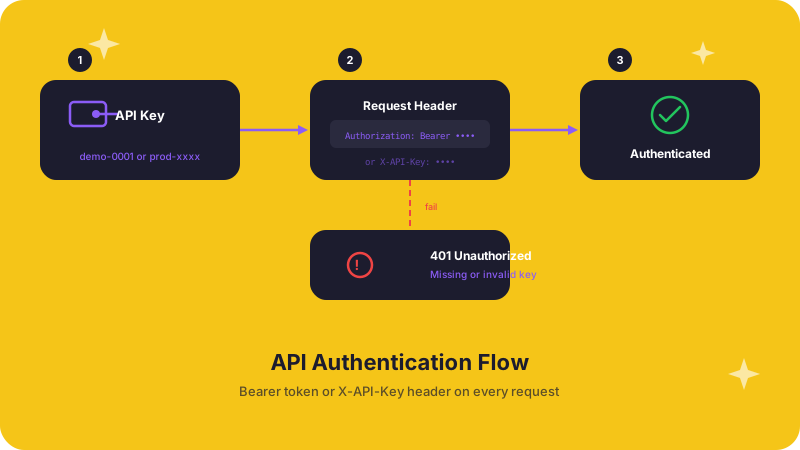
Every API request requires authentication. ALT Sports Data uses API keys passed via HTTP headers -- no OAuth flows, no session tokens.
Getting your API key
For testing, use a demo key. Any key matching the pattern demo-xxxx works (for example, demo-0001). Demo keys provide access to a curated subset of public endpoints with lower rate limits.
For production, contact the ALT Sports Data team:
- Email: connect@altsportsdata.com
- Website: altsportsdata.com
Authentication methods
ALT Sports Data accepts two equivalent header formats. Use whichever your HTTP client makes easiest.
Bearer token (recommended)
Authorization: Bearer YOUR_API_KEYX-API-Key header
X-API-Key: YOUR_API_KEYExample requests
# Using Bearer token
curl -X GET "https://api.altsportsdata.com/api/v1/public/health" \
  -H "Authorization: Bearer YOUR_API_KEY"

# Using X-API-Key header
curl -X GET "https://api.altsportsdata.com/api/v1/public/health" \
  -H "X-API-Key: YOUR_API_KEY"
import { AltSportsData } from 'altsportsdata';
// The SDK handles authentication automatically
const client = new AltSportsData({
apiKey: process.env.ASD_API_KEY,
});
const health = await client.health();
console.log(health.data.status); // "healthy"from altsportsdata import AltSportsData
# The SDK handles authentication automatically
client = AltSportsData(api_key="YOUR_API_KEY")
health = client.health()
print(health.data["status"]) # "healthy"const response = await fetch(
"https://api.altsportsdata.com/api/v1/public/health",
{
headers: {
Authorization: "Bearer YOUR_API_KEY",
},
}
);
const data = await response.json();
console.log(data);req, _ := http.NewRequest("GET", "https://api.altsportsdata.com/api/v1/public/health", nil)
req.Header.Set("Authorization", "Bearer YOUR_API_KEY")
resp, _ := http.DefaultClient.Do(req)
defer resp.Body.Close()
body, _ := io.ReadAll(resp.Body)
fmt.Println(string(body))Authentication errors
| Status Code | Meaning | What to check |
|---|---|---|
401 Unauthorized | Missing or invalid API key | Verify the key is present and correctly formatted |
403 Forbidden | Key lacks access to the requested resource | Confirm your plan includes the endpoint you are calling |
429 Too Many Requests | Rate limit exceeded | Back off and retry after the X-RateLimit-Reset timestamp |
Demo vs. production keys
Demo Key (demo-xxxx) | Production Key | |
|---|---|---|
| Access | Curated public dataset | Full account access |
| Rate limit | 100 requests/hour | Based on plan |
| Real-time data | No | Yes |
| WebSocket access | No | Yes |
| Support | Community | Dedicated |
Security best practices
- Store keys in environment variables -- use
ASD_API_KEYas the standard variable name - Never expose keys in client-side code or commit them to version control
- Rotate keys regularly, especially if a key may have been exposed
- Use HTTPS only -- all API traffic is served over TLS, and plaintext requests are rejected
- Scope keys to their purpose -- use demo keys for development and testing, production keys for live traffic
Need help?
For API access, technical support, or partnership inquiries, contact connect@altsportsdata.com.