Error Handling
Interpret ALT Sports Data API error responses and build resilient clients.
Error Handling
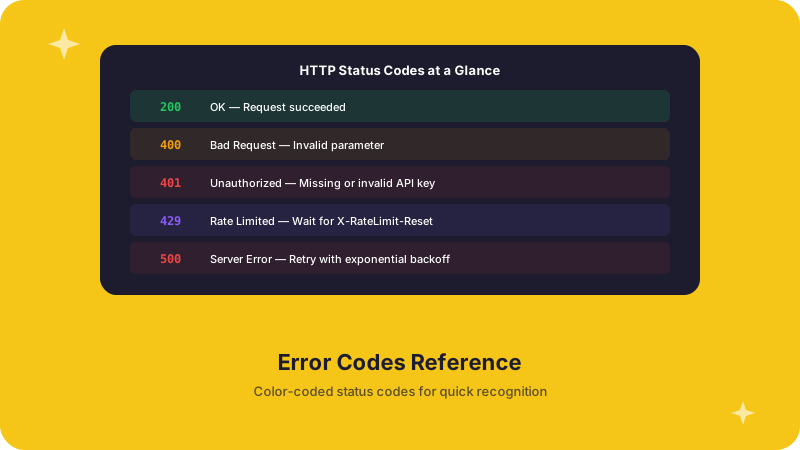
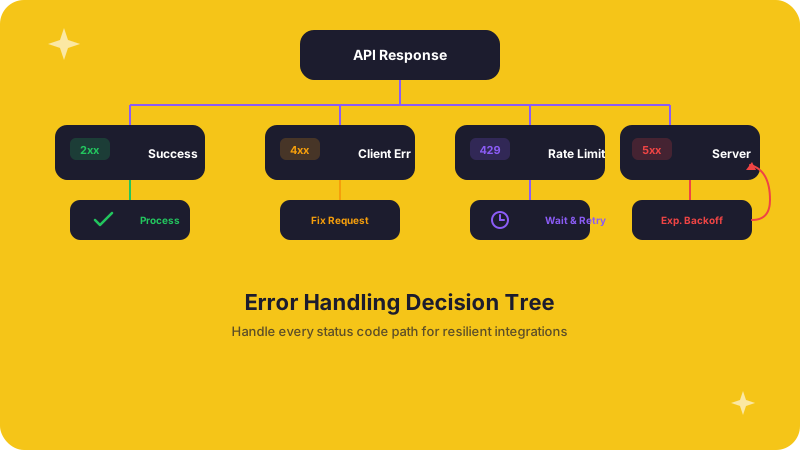
The ALT Sports Data API uses standard HTTP status codes and returns structured error bodies so you can diagnose problems programmatically, not just by reading messages.
HTTP status codes
| Code | Status | When you will see it |
|---|---|---|
| 200 | OK | Request succeeded |
| 201 | Created | Resource created successfully |
| 400 | Bad Request | A query parameter or request body is invalid |
| 401 | Unauthorized | API key is missing or malformed |
| 403 | Forbidden | API key is valid but lacks permission for this resource |
| 404 | Not Found | The requested resource does not exist |
| 429 | Too Many Requests | You have exceeded your rate limit -- see Rate Limits |
| 500 | Internal Server Error | Something went wrong on our side |
| 503 | Service Unavailable | Temporary disruption; safe to retry after a short delay |
Error response format
Every error response follows the same structure:
{
  "error": {
    "code": "ERROR_CODE",
    "message": "Human-readable explanation of what went wrong",
    "details": {
      "field": "Additional context, if available"
    }
  }
}
The code field is a stable machine-readable identifier. The message field is meant for logs and developer debugging -- do not display it to end users.
Common errors and how to fix them
INVALID_API_KEY (401)
{
  "error": {
    "code": "INVALID_API_KEY",
    "message": "The provided API key is invalid or has been revoked"
  }
}
Fix: Verify that your key is correct and has not been rotated. Check that the header name is Authorization: Bearer <key> or X-API-Key: <key>.
VALIDATION_ERROR (400)
{
  "error": {
    "code": "VALIDATION_ERROR",
    "message": "Invalid request parameters",
    "details": {
      "limit": "Must be between 1 and 100",
      "offset": "Must be a non-negative integer"
    }
  }
}
Fix: Check the details object -- it tells you exactly which parameter failed and why. Correct the value and retry.
RESOURCE_NOT_FOUND (404)
{
  "error": {
    "code": "RESOURCE_NOT_FOUND",
    "message": "Event with ID 'evt_abc123' not found"
  }
}
Fix: Confirm the resource ID is valid. IDs are case-sensitive. If you received the ID from a previous call, the resource may have been removed or the event may have concluded.
RATE_LIMIT_EXCEEDED (429)
{
  "error": {
    "code": "RATE_LIMIT_EXCEEDED",
    "message": "Rate limit exceeded. Please retry after 1678886400",
    "retry_after": 1678886400
  }
}
Fix: Wait until the retry_after timestamp, then retry. See Rate Limits for backoff strategies.
Building a resilient API client
The following example handles authentication errors, validation failures, rate limits, and transient server errors in one function.
import requests
import time

API_BASE = "https://api.altsportsdata.com/api/v1/public"

def asd_request(path, headers, params=None, max_retries=3):
    """Make a request to ALT Sports Data with automatic retry on transient errors."""
    url = f"{API_BASE}/{path}"

    for attempt in range(max_retries):
        response = requests.get(url, headers=headers, params=params)

        if response.status_code == 200:
            return response.json()

        error = response.json().get("error", {})
        code = error.get("code", "UNKNOWN")

        if response.status_code == 401:
            raise ValueError(f"Authentication failed: {error.get('message')}")

        if response.status_code == 400:
            raise ValueError(f"Validation error: {error.get('details', error.get('message'))}")

        if response.status_code == 404:
            return None  # Resource does not exist

        if response.status_code == 429:
            wait = max(int(error.get("retry_after", time.time() + 5)) - int(time.time()), 1)
            print(f"Rate limited. Retrying in {wait}s...")
            time.sleep(wait)
            continue

        if response.status_code >= 500:
            wait = 2 ** attempt
            print(f"Server error ({response.status_code}). Retrying in {wait}s...")
            time.sleep(wait)
            continue

        response.raise_for_status()

    raise Exception(f"Request failed after {max_retries} retries")
const API_BASE = "https://api.altsportsdata.com/api/v1/public";
async function asdRequest(path, headers, maxRetries = 3) {
const url = `${API_BASE}/${path}`;
for (let attempt = 0; attempt < maxRetries; attempt++) {
const response = await fetch(url, { headers });
if (response.ok) {
return await response.json();
}
const body = await response.json();
const error = body.error || {};
if (response.status === 401) {
throw new Error(`Authentication failed: ${error.message}`);
}
if (response.status === 400) {
throw new Error(`Validation error: ${JSON.stringify(error.details || error.message)}`);
}
if (response.status === 404) {
return null; // Resource does not exist
}
if (response.status === 429) {
const wait = Math.max((error.retry_after || Math.floor(Date.now() / 1000) + 5) - Math.floor(Date.now() / 1000), 1);
console.log(`Rate limited. Retrying in ${wait}s...`);
await new Promise((r) => setTimeout(r, wait * 1000));
continue;
}
if (response.status >= 500) {
const wait = 2 ** attempt;
console.log(`Server error (${response.status}). Retrying in ${wait}s...`);
await new Promise((r) => setTimeout(r, wait * 1000));
continue;
}
throw new Error(`Unexpected error: ${response.status}`);
}
throw new Error(`Request failed after ${maxRetries} retries`);
}Best practices
- Branch on status code first, then on
error.code-- the status code tells you the category, the error code tells you the specific problem - Retry only on transient errors -- 429, 500, and 503 are safe to retry; 400, 401, and 403 are not
- Log the full error body -- the
messageanddetailsfields contain the information you need to debug - Never surface raw error messages to end users -- parse the structured response and show a user-friendly message instead
- Set reasonable timeouts -- if the API does not respond within 10-15 seconds, treat it as a transient failure and retry