Event Time Changes
How to handle delays, reschedules, and start-time shifts so your boards, alerts, and trading windows stay accurate.
Event Time Changes
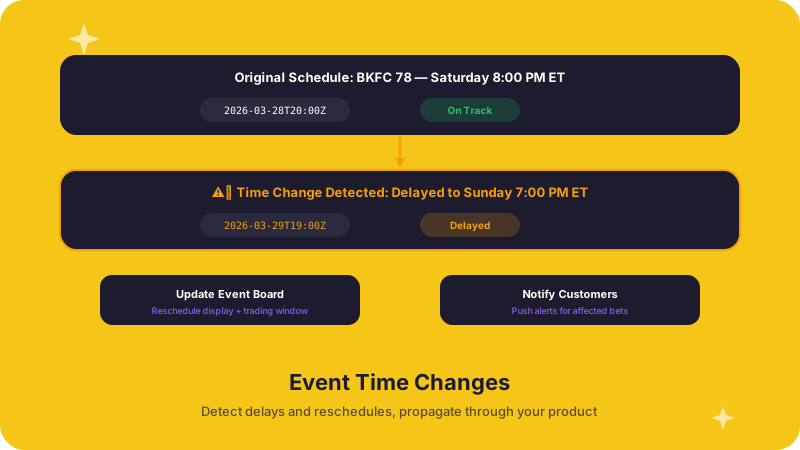
Event start times in alternative sports are often less predictable than in major professional leagues. Weather delays at an outdoor drone race, venue issues at a jai alai fronton, or broadcast scheduling changes can all push a start time forward or back — sometimes with very little advance notice.
Why this matters to operations teams
A shifted start time is not just a UI update. It touches multiple systems at once:
- Board ordering. Events sorted by start time will appear in the wrong position if the time changes and your frontend does not re-sort.
- Notification timing. Pre-event alerts, "starting soon" badges, and push notifications fire at the wrong moment — or not at all.
- Marketing schedules. Promotional placements tied to specific event windows become inaccurate.
- Trading windows. If your platform suspends or adjusts markets based on proximity to start time, a time shift can leave markets open too long or close them prematurely.
- Internal reconciliation jobs. Batch processes that run relative to event times (settlement checks, reporting snapshots) may miss the event entirely or process it too early.
Recommended approach
1. Treat start time as mutable until the event is underway
Never assume a scheduled start time is final. Your data model should store the latest start time from the API and be prepared to overwrite it on every refresh.
2. Refresh event data on a predictable cadence
Poll the ALT Sports Data events endpoint regularly — every few minutes for events within the next 24 hours, and less frequently for events further out. Increase your polling frequency as an event's scheduled start approaches.
3. Propagate time changes immediately
When you detect a start-time change:
- Re-sort boards and event lists so the display order stays correct.
- Recalculate alert schedules. Cancel pending notifications tied to the old time and reschedule them against the new time.
- Adjust trading logic. If your platform uses time-based market suspension rules, re-evaluate them against the updated start time.
- Notify support and trading teams of the change so they can handle any customer questions proactively.
4. Display the change to customers
If a start time moves significantly (more than a few minutes), consider surfacing it explicitly — a "Rescheduled" badge or an inline note — rather than silently updating the time. Transparency builds trust.
5. Keep a change log
Record every start-time update with the old value, the new value, and the timestamp of the change. This history is useful for post-event audits and for tuning your polling frequency over time.
Relevant API endpoints
- Use the events endpoints to retrieve the latest start time, status, and scheduling metadata for any event.
Further reading
- Player Roster Changes — roster updates and schedule shifts often happen together.
- Event Result Changes — delayed events can complicate result reconciliation.
Player Roster Changes
How to detect and respond to roster and participant updates that affect event boards, prop markets, and customer-facing displays.
Event Result Changes
How to reconcile final outcomes, handle corrections, and keep settlement-sensitive workflows accurate after results land or change.