Player Roster Changes
How to detect and respond to roster and participant updates that affect event boards, prop markets, and customer-facing displays.
Player Roster Changes
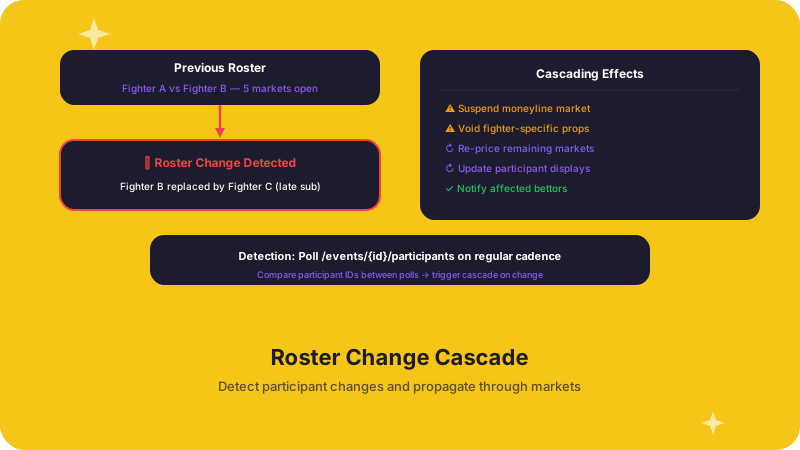
In alternative sports — from jai alai to drone racing — roster and participant changes happen frequently and often on short notice. A late scratch, a substitute entry, or an updated competitor list can immediately affect which markets are valid, how odds are priced, and what information your customers see on an event card.
Why this matters to operations teams
Roster changes are not cosmetic. They can:
- Invalidate player-specific markets. A prop bet on a scratched competitor needs to be pulled or voided before customers place wagers on it.
- Shift odds across remaining markets. Removing a favorite from a field changes the probability distribution for every other participant.
- Break cached display data. If your frontend caches participant names, photos, or stats, stale data will confuse customers and erode trust.
- Trigger compliance obligations. Some jurisdictions require that material changes to an event are surfaced to bettors before they can continue wagering.
Recommended approach
1. Poll participant data as part of your event refresh cycle
Include participant and roster fields every time you refresh event data from the ALT Sports Data API. Do not treat roster data as static after initial load — treat it as mutable until the event is final.
2. Diff against your local state
Compare the incoming participant list against what you currently have stored. Flag additions, removals, and field-level changes (e.g., status changes from "confirmed" to "scratched").
3. Cascade changes to dependent systems
When a roster change is detected:
- Markets: Re-evaluate which markets remain valid. Suspend or void markets tied to removed participants.
- Odds: Trigger a re-fetch of odds for the affected event to pick up any pricing adjustments.
- Frontend: Invalidate cached event cards and participant displays so customers see the current state.
- Alerts: Notify internal trading and support teams so they can handle edge cases that automation does not cover.
4. Log everything
Record the before-and-after state of every roster change with timestamps. This audit trail is essential for settlement disputes, compliance reviews, and debugging.
Relevant API endpoints
- Use the events endpoints to retrieve current participant data for a given event.
- Use the players endpoints (via the Data API) to look up detailed participant information.
Further reading
- Event Time Changes — schedule shifts often accompany roster changes.
- Event Result Changes — roster corrections after an event can affect settlement.
Daily Processes and Reconciliations
Operational playbook for handling the routine data changes that affect your sportsbook every day — roster swaps, schedule shifts, and result corrections.
Event Time Changes
How to handle delays, reschedules, and start-time shifts so your boards, alerts, and trading windows stay accurate.