For SportsbooksGetting Started with Live Market Odds API
Working with /events
Use the events endpoints to discover schedules, track statuses, resolve participants, and fetch event-level odds.
Working with /events
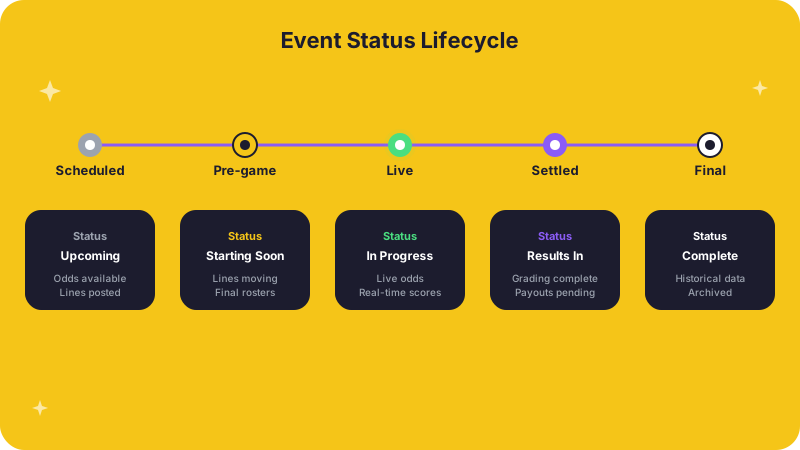
The /events surface is the operational center of most live integrations. It
is where you pull upcoming and in-play schedules, track status transitions, and
move from an event inventory into event-level odds and participant detail.
When to use it
- Building an upcoming or in-play event board for your sportsbook or widget
- Filtering events by sport, league, date window, or status
- Fetching event-specific odds, participants, or deeper market views once you
have an
eventId
Typical workflow
- List events -- Call the list events endpoint with the sport, league, date range, or status filters your product requires.
- Store the
eventId-- Every event in the response includes a stable identifier you will use for all follow-up calls. - Fetch detail -- Use that
eventIdto retrieve event-level odds, participant rosters, or specialized views like same-game parlay eligibility.
What to watch for
- Status transitions -- Events move through
upcoming,live,completed,cancelled, andpostponed. Your integration should handle each state, especially for display logic and settlement. - Participant changes -- Roster or matchup updates can affect which markets are available. Re-fetch participants when your polling cycle detects a change.
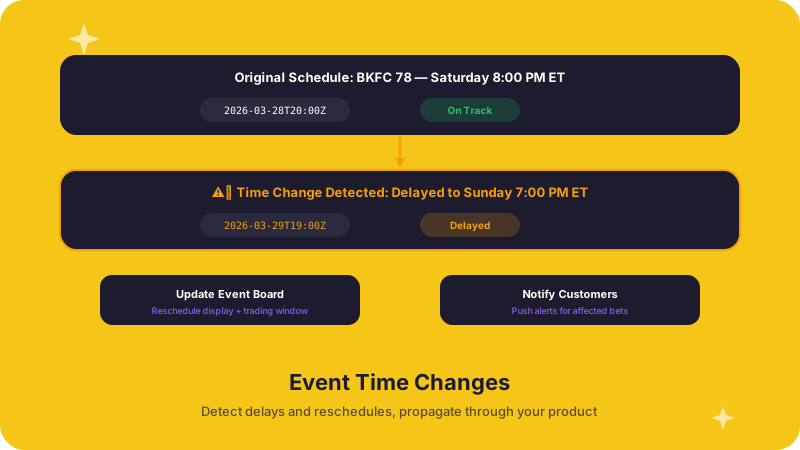
- Start-time updates -- Scheduled start times can shift. If your UI or trading window depends on start time, poll periodically or subscribe to updates.